
Discover
Review your source documents, product catalog, ERP interfaces and delivery requirements.
A purchase order comes in, products are matched, a person approves, the ERP order is posted, and the appointment date drives the delivery. Exceptions stop for review. Everything else keeps moving.
From purchase-order documents to ERP orders and delivery creation. Two products, connected around your process.
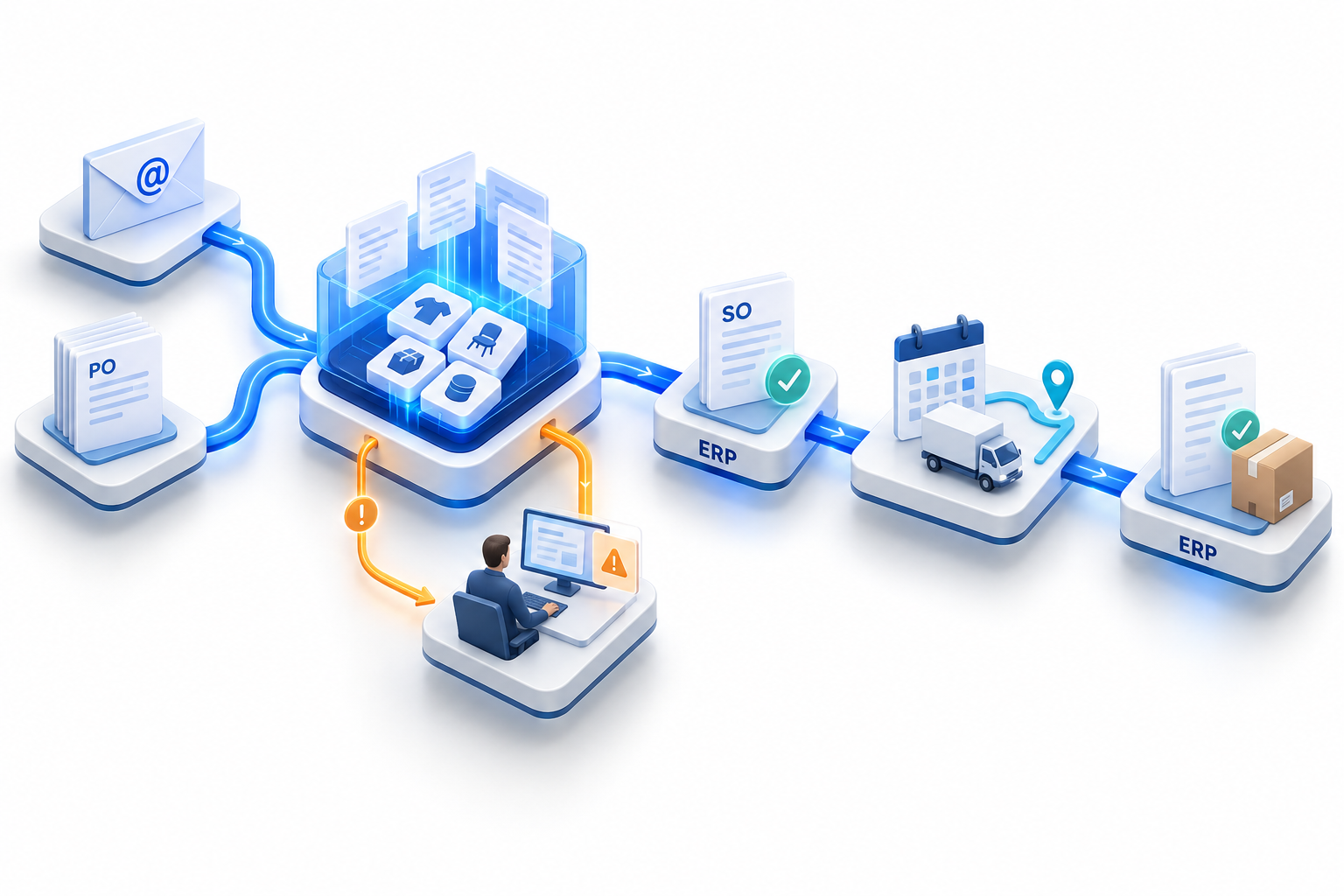
Purchase-order documents arrive through configured email and document sources. Relevant details become structured order data.
Extract order details into a structured record.
Use product mappings and review uncertain matches.
Route the order to the right people for a decision.
Post through the configured interface and track the outcome.
Uncertain product match → team review → confirmed mapping → continue to approval.
Appointment date and transit days connect the next stage.
Start with the date the goods are expected.
Use the travel time needed to reach the destination.
Bring both inputs together for delivery creation.
Give the dispatch team the record for the next step.
A focused pilot makes the workflow concrete before a wider rollout.
Review your source documents, product catalog, ERP interfaces and delivery requirements.
Set up mappings, permissions, approval rules and the integration steps for your project.
Run representative orders with your team, check the outcomes and agree the next phase.
What to expect from the products, your workflow and implementation.
Most customers are live within 30 days, including ERP connector setup, SKU mapping and a pilot with a handful of customers before full rollout.
Sales Order Automation helps your team process customer purchase orders, match products, review exceptions and connect approved orders to your ERP. Appointment Automation uses the appointment date and transit days on an order to drive delivery creation in the ERP.
No. Your ERP remains the system of record. OrdIntel connects the work around incoming orders and delivery planning to the systems your business already uses.
Yes. Sales Order Automation supports project-specific approval stages, assigned approvers, conditional routing and customer or customer-group exceptions.
Unresolved customer material codes can be reviewed with suggested SKU matches and confidence scores. Your team confirms the correct mapping so it can be reused for that customer or group.
Yes. It uses appointment dates and transit days recorded against orders to drive delivery creation in the ERP. In a demo, we can review how this fits your delivery process.
Your source documents, ERP interfaces, product mappings, approval rules and delivery requirements determine the scope. We review these with you and agree a pilot and rollout plan.
Yes. Company and project configuration lets teams organize users, master data, integrations and approval workflows around their operations, with role-based access.
We will show capture, product matching, approval, and how the appointment date becomes an ERP delivery.